

How to leave a party
- Open the main menu and choose Party.
- Choose the door-shaped exit control at the bottom right of the Party screen.
- Confirm Leave current party, then check that the previous party members are no longer shown.
These steps use the PC interface. On a controller, select the exit control and follow its button prompt.
Stop following in Companion Mode
Use the available Exit control to end the Companion interaction and check that shared movement stops. Leaving the party also exits Companion Mode for that member.
Moving away can be temporary. The game’s help text says you rejoin the guide when you stop controlling your character. To leave entirely, use the Party exit steps above.
Leave a friend’s Home
A Home visit, a party and Companion Mode can have separate controls. Open the map or Home interface and use the travel or return option your client offers. A single cross-platform Home-exit shortcut is not confirmed here.
Check that your destination is your own Home or the location you selected. If shared movement continues, end Companion Mode; if you also want to leave the group, use Party exit.
Co-op, PvP and Egg Heist
Egg Heist is PvEvP: three-person teams face environmental threats and other players in the Lost Isles. The launch developer letter adds more egg types and a high-difficulty Chaos Mode. Its three-person team limit should not be applied to every co-op activity.
| Mode / listing | Published information |
|---|---|
| Online co-op | Supported according to Steam; Xbox lists 2-4 players |
| Online PvP | Listed on Steam |
| Egg Heist | Three-player teams searching and battling in the Lost Isles |
Find friends and form a party
- Agree on a server before building progress. On PS5, check which server your PSN region selects.
- Open the main menu and choose Friends. Use the add-friend area and your friend’s UID; the English PC footage shows the UID at the bottom right of the game screen.
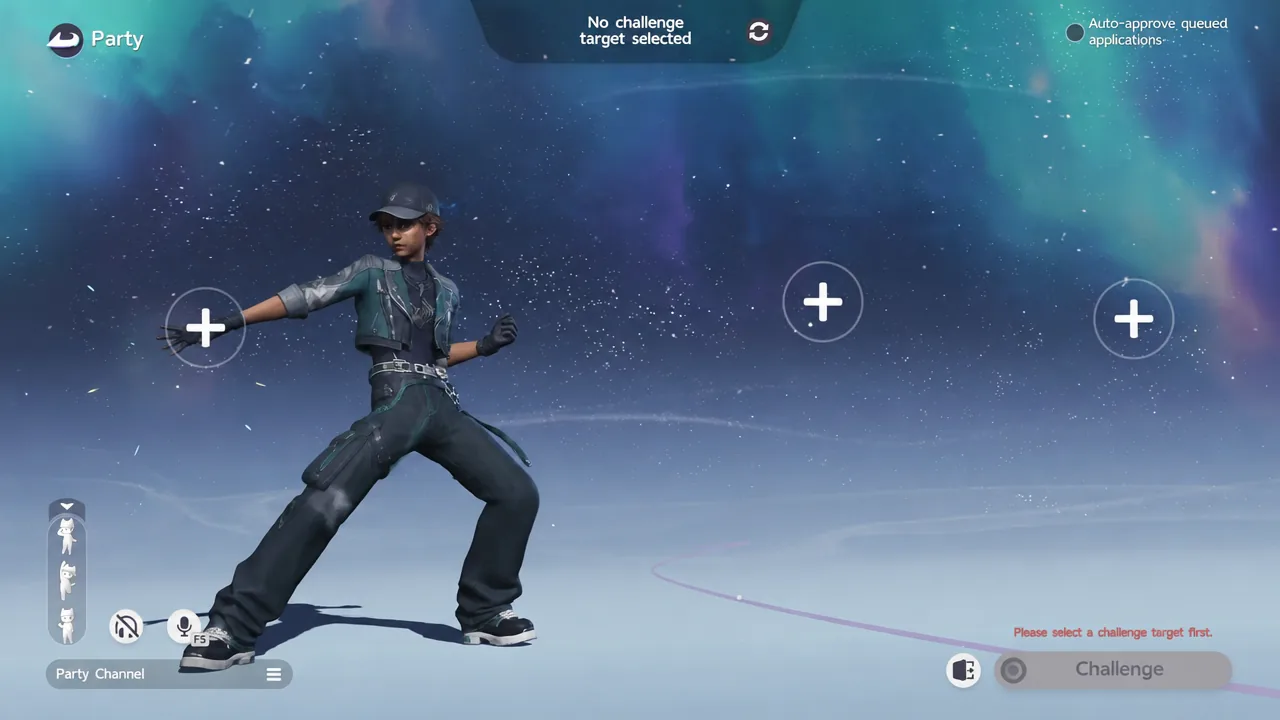
- Open Party from the main menu and use an empty + slot to arrange your group. Your friend needs to respond to the invitation in their client.
- Select an available challenge target before starting: the Party screen warns that a target is required.
These steps use the English PC menus; controller buttons may differ. Check the activity’s unlock requirement and progress-sharing rules before you start.
Travel together in Companion Mode
Open your friend’s player interaction panel and choose Companion Mode to send an invitation, or Ask to Join Companion to accompany them. Since the September 23 update, you no longer need to stand face-to-face to send a Companion invitation.
Once your friend accepts, check that Companion Mode is active. Rare resources gathered by a player are shared with party members in the Companion state. Story quests and teleport unlocks still need their own checks.
Confirm you joined the intended activity
- After sending an invitation, have the other player check and respond in their client; sending it is not confirmation that they joined.
- Before starting, check the names shown in Party and the selected challenge target. Use that activity’s member limit, not the maximum from a store listing.
- For Companion Mode, confirm that you are travelling together and that the Exit control is available. Check each player’s own quest or reward screen before assuming progress was shared.
Use Party for a supported challenge and the player interaction panel for Companion Mode. Friends-list membership by itself is not an active session.
When a friend cannot join
| What you see | What to check |
|---|---|
| Friend cannot be found | Compare the UID and selected server. Changing server does not move an existing character. |
| Party or an activity is locked | Follow the requirement displayed in your client and continue the opening story. A shared unlock level for all activities is not confirmed. |
| Challenge will not start | Choose a challenge target and check the activity’s own member requirements. |
| A mobile friend cannot enter | Mobile launched September 23. Check device compatibility, current maintenance notices, account and server. |
| Quest progress differs between players | Check the particular activity’s rules. Joining a party does not by itself confirm shared story completion. |
Choose a Holo-Battle route
At Trailblazer I, Holo-Battle Interlink opens from Thursday 04:00 to Monday 03:59 each week. Play its three routes with up to four players or AI teammates, then claim Star Rank and Support Rewards.
Can friends on other devices join?
Cross-platform multiplayer is advertised, and the FunPlus interview discusses PC, console and mobile players playing together. Cross-save, shared purchases and cross-region matchmaking are separate capabilities.
Sources
- Official September 23 update and event schedule
- Official mobile launch · September 23, 2026
- MonkeyKingHero · English PC co-op footage, 00:05-00:50
- AlphaGalaxyy · Companion Mode PC demonstration, 01:30-02:00
- Aniimo on Steam
- Aniimo on Xbox
- GamesBeat · Chris Petrovic interview
- Official launch, preload and account FAQ · Sep 14, 2026
- A letter from the developers · Sep 3, 2026